Small Business Budgeting Software Guide
Table of Contents
- Introduction
- Problems Small Business Budgeting Software Should Solve
- Core Budget Planning Software Features and Models
- Small Business Budgeting Software Integrations and Data Quality
- Forecasting Software Scenarios, Approvals, and Financial Controls
- Reporting and Permissions in Business Budgeting Tools
- Financial Planning Software Implementation and Change Management
- Total Cost of Business Budgeting Tools and Alternatives
- Small Business Budgeting Software Buying Checklist
- Conclusion
- Introduction
- Problems Small Business Budgeting Software Should Solve
- Core Budget Planning Software Features and Models
- Small Business Budgeting Software Integrations and Data Quality
- Forecasting Software Scenarios, Approvals, and Financial Controls
- Reporting and Permissions in Business Budgeting Tools
- Financial Planning Software Implementation and Change Management
- Total Cost of Business Budgeting Tools and Alternatives
- Small Business Budgeting Software Buying Checklist
- Conclusion
Introduction
Small business budgeting software can replace a fragile collection of spreadsheets, email approvals, and manually assembled reports. Yet buying a system too early, or choosing one that does not fit the accounting workflow, can create more reconciliation work than it removes.
This finance systems guide evaluates budget planning software across:
- Planning models, forecasts, and scenario analysis
- Accounting, ERP, payroll, and spreadsheet integrations
- Approvals, permissions, reporting, and audit controls
- Setup effort, data quality, and ongoing administration
- Total cost and a practical buying checklist
TL;DR: Choose financial planning software that creates a controlled planning process, fits the company today, and does not force the finance team into an oversized platform.
Source page reviewed in Chrome during article research. Follow the image link for the current page.
Problems Small Business Budgeting Software Should Solve
A spreadsheet is often adequate when one person maintains a single annual budget. Small business budgeting software becomes more useful when managers submit assumptions, actuals come from multiple systems, or forecasts require monthly updates.
Typical signals that a company has outgrown a spreadsheet-only process include:
- Budget owners emailing competing versions of the same workbook
- Finance spending days copying actuals into planning templates
- Department managers seeing salary or vendor data they should not access
- Formulas breaking when accounts, entities, or periods are added
- Management requesting several scenarios before each board meeting
- No record of who changed or approved a number
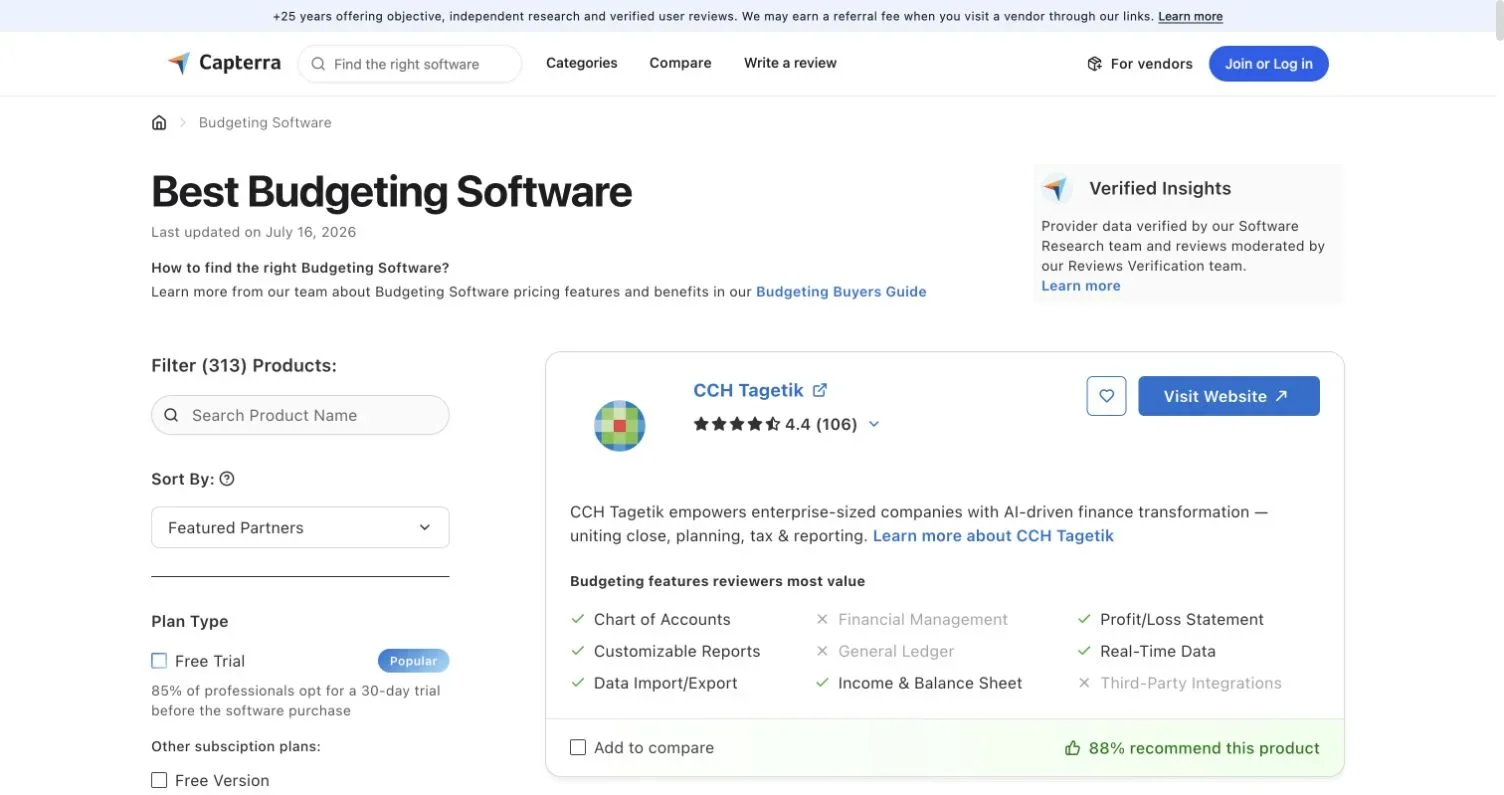
The current Capterra budgeting software directory lists 313 products and says it was updated July 16, 2026. Its feature categories include forecasting, cash management, reporting, data import, consolidation, and scenarios. Its default ordering includes featured partners, so it is useful for building a longlist, not as an independent ranking.

Source screenshot: Capterra Budgeting Software directory, accessed July 19, 2026.
Before reviewing business budgeting tools, quantify the process problem, for example, cutting forecast preparation from five days to two, eliminating manual actuals uploads, or delivering department reports within one business day of close.
Core Budget Planning Software Features and Models
Good budget planning software should represent how the business earns revenue, incurs costs, and manages cash. A polished dashboard cannot compensate for a planning model that finance cannot understand or maintain.
| Capability | What to Test | Warning Sign |
|---|---|---|
| Driver-based planning | Revenue, headcount, volume, price, and utilization formulas | Every account must be entered manually |
| Rolling forecasts | Ability to add future months as periods close | Forecast horizon is fixed to the fiscal year |
| Three-statement planning | Links among income statement, balance sheet, and cash flow | Cash is calculated outside the system |
| Scenario management | Separate base, upside, and downside assumptions | Users overwrite one shared forecast |
| Workforce planning | Start dates, compensation, taxes, and benefits | Payroll costs rely on a single flat percentage |
| Version control | Locked approved versions and traceable working copies | Published budgets can be edited silently |
| Allocations | Transparent rules for shared expenses | Allocation logic is hidden or vendor-maintained |
Ask each budget planning software vendor to build one representative calculation during the demonstration. For a subscription company, that could be opening customers plus new customers minus churn. A retailer might test units multiplied by price, with seasonal purchasing and payment timing. This reveals whether the business budgeting tools support operating drivers or merely general-ledger entry.
Model ownership also matters. Finance should be able to add an account, update a driver, and inspect calculation logic without opening a support ticket. My bias is simple: if the team cannot explain how a forecast number was produced, it should not approve the model.
Small Business Budgeting Software Integrations and Data Quality
Integrations determine whether small business budgeting software enables reliable budgeting automation or becomes another monthly spreadsheet project. Start with the general ledger, then trace the complete data path through payroll, customer relationship management, billing, banking, and expense systems.
| Data Source | Required Detail | Validation Test |
|---|---|---|
| Accounting or ERP | Account, entity, department, class, project, and period | Trial balance agrees to the closed ledger |
| Payroll or HR | Employee, role, start date, compensation, and benefits | Workforce totals reconcile to payroll expense |
| CRM or billing | Pipeline, customer, product, contract value, and timing | Revenue drivers tie to billed and recognized revenue |
| Bank or treasury | Account balances and cash movements | Opening and closing cash reconcile by account |
| Spreadsheets | Controlled templates and mapping rules | Rejected rows and duplicate records are visible |
Do not accept a vendor’s integration claim alone. Determine whether the connection is native, API-based, file-based, or supplied by a third party. Ask how frequently it refreshes, which dimensions it imports, how errors are reported, and what happens when the chart of accounts changes.
Create a data acceptance rule before setup. A reasonable starting point is 100% agreement between imported general-ledger balances and the source trial balance, with every unmapped account assigned an owner. Set decision-appropriate tolerances for operational data. A sales pipeline may tolerate timing differences; closed accounting balances should not.
The Capterra buyer guide also recommends assessing finance integrations and checking imported records for missing or duplicate values. Many business budgeting tools projects stumble there.
Forecasting Software Scenarios, Approvals, and Financial Controls
Forecasting software should let users change scenario assumptions without duplicating the entire model. In budget planning software and forecasting software, test whether a scenario can vary revenue growth, hiring dates, gross margin, payment timing, and capital spending independently.
A practical scenario process follows four steps:
- Finance publishes a controlled base case with documented assumptions.
- Authorized users create alternatives without changing the base case.
- Reports show the financial effect and the assumptions that caused it.
- An approver selects and locks the version used for decisions.
A 20-person agency could compare hiring a project manager in April versus July. The model should update salary, payroll taxes, utilization, project capacity, profit, and cash. If staff must repair formulas after each scenario, the budgeting automation has failed.
Approval design deserves equal attention. Define the approval path and what happens when finance returns a submission. Look for comments, status tracking, submission deadlines, reminders, locks, and an audit history.
Controls should match risk. Apply separation of duties so a user cannot both submit and give final approval to the same budget. Require named accounts rather than shared logins. Retain approved versions and record administrative changes. These controls make small business budgeting software defensible during management reviews and external audit preparation, even without complex regulatory requirements.
Reporting and Permissions in Business Budgeting Tools
Business budgeting reports should answer operating questions without monthly rebuilding. During evaluation, load real sample data and produce the reports management already uses.
Useful outputs from business budgeting tools include:
- Budget versus actual by account, department, project, and entity
- Monthly and year-to-date variance with owner comments
- Rolling cash forecast with expected receipts and payments
- Headcount plan compared with active employees and open roles
- Scenario comparisons showing both assumptions and outcomes
- Consolidated income statement with eliminations where applicable
Test drill-down from a summary variance to the contributing accounts or transactions. Also check whether users can export a clean spreadsheet or presentation-ready table. Exports remain important; replacing uncontrolled spreadsheets should not prevent analysis in Excel or Google Sheets.
Permission testing should use realistic roles. A department manager may need payroll totals, but not employee-level compensation. An entity controller may need one subsidiary, while the CFO needs consolidated results. Administrators should be able to separate model building, data loading, submission, approval, and report access.
Follow least privilege: grant only necessary access and review it periodically. The software should also support prompt deactivation when an employee changes roles or leaves. Ask whether single sign-on and automated user provisioning require a higher plan, because that affects both control quality and total cost.
Financial Planning Software Implementation and Change Management
Even lightweight small business budgeting software or financial planning software requires process design, data mapping, model construction, testing, and training. A short setup can take several weeks; a multi-entity, driver-based model may take months. Vendor estimates require explicit scope and customer responsibilities.
Organize implementation as follows:
- Design: Document the chart of accounts, planning dimensions, calendar, owners, approval route, reports, and forecast frequency.
- Connect: Configure source integrations and map accounts, departments, entities, products, and projects.
- Build: Reproduce the agreed planning model, calculations, allocations, scenarios, and reports.
- Validate: Reconcile actuals, compare calculations with the existing model, and test permissions and approvals.
- Pilot: Run one department or entity through a complete planning cycle before broader deployment.
- Operate: Assign an internal administrator and document monthly refresh, mapping, access review, and version-lock procedures.
Require a reconciliation pack at go-live. Show source and imported totals, mapping exceptions, model outputs, and approval evidence. For financially material decisions, run both processes for at least one forecast cycle.
Training should be role-based. Budget owners need submission and commentary skills; finance needs model administration and troubleshooting; executives need scenario and report navigation. A concise operating guide beats a generic product tour.
Track outcomes after deployment. Budgeting automation measures include actuals-loading hours, forecast completion time, mapping exceptions, late submissions, and report preparation time. These metrics reveal whether the budget planning software has improved the process.
Total Cost of Business Budgeting Tools and Alternatives
Subscription price is only one component of the total cost of business budgeting tools. Compare business budgeting tools over at least three years using consistent volume assumptions.
| Cost Component | Questions to Ask |
|---|---|
| Subscription | Is pricing based on users, planners, entities, revenue, data volume, or modules? |
| Setup | Are model building, migration, consolidation, and testing included? |
| Connectors | Do accounting, payroll, CRM, or warehouse connections cost extra? |
| Security | Are single sign-on, audit logs, and advanced permissions restricted by plan? |
| Support | What response level is included, and is a named success contact extra? |
| Internal labor | How many finance, IT, and operations hours are required? |
| Ongoing change | Who maintains mappings, drivers, reports, and newly acquired entities? |
| Exit | Can the company export data, models, assumptions, and audit history? |
Capterra reports an entry-level range of $6 to $1,250 or more per month, but the page clearly states that the calculation used vendor pricing available on November 3, 2023. It shows the category’s range, not current purchasing guidance. Request a written quote tied to your user count, entities, modules, setup scope, support, and renewal terms.
Compare alternatives fairly. A protected spreadsheet plus accounting exports may remain appropriate for a stable, single-entity company. An accounting package’s built-in budget module can work when planning is account-based. Dedicated financial planning software earns its cost when integrations, forecasting software, distributed input, or governance materially reduce work and decision risk.
Calculate the value of budgeting automation conservatively. Count labor genuinely removed, external consulting avoided, and faster decisions with a documented financial effect. Ignore vague promises of better insight.
Small Business Budgeting Software Buying Checklist
Use this checklist after vendors demonstrate identical scripted cases. Free-form demos hinder comparison because sellers emphasize their strongest screens.
| Item | What to Check | Why It Matters |
|---|---|---|
| Planning fit | Drivers, rolling forecasts, workforce plans, cash, allocations, and scenarios | The model must reflect how the company operates |
| Accounting integration | Dimensions, refresh frequency, mapping, errors, and reconciliation | Weak integration preserves manual work |
| Spreadsheet support | Controlled imports, exports, templates, and formula visibility | Finance still needs flexible analysis |
| Workflow | Submission, review, return, approval, comments, deadlines, and locks | Informal email approval creates ambiguity |
| Permissions | Role, entity, department, report, model, and data-level access | Sensitive financial and payroll data need boundaries |
| Auditability | Change history, version history, approvals, and administrator logs | Reviewers need evidence of what changed |
| Reporting | Variance, cash, headcount, consolidation, drill-down, and exports | Reports must support recurring decisions |
| Administration | Internal ability to update accounts, drivers, mappings, and users | Vendor dependence raises cost and slows change |
| Setup | Named deliverables, responsibilities, timeline, testing, and training | A license alone does not produce a working process |
| Reliability | Backup, recovery, service commitments, and support escalation | Planning deadlines cannot wait indefinitely |
| Total cost | Subscription, services, connectors, support, internal labor, and renewal | Low entry pricing can conceal the real commitment |
| Data exit | Export formats, retention, deletion, and transition support | The company needs a workable exit route |
Four cases show why no product is universally best:
- A founder-led consultancy needing accounting actuals, a 13-week cash forecast, and simple scenarios may need only a lightweight tool.
- A seasonal retailer may prioritize inventory purchasing, store-level budgets, payment timing, and point-of-sale data.
- A growing software company may need revenue drivers, headcount planning, CRM and payroll connections, and board-ready scenario reports.
- A multi-entity services group may place consolidation, currency treatment, eliminations, and entity permissions ahead of interface simplicity.
Score each requirement as mandatory, preferred, or unnecessary. Require vendors to prove mandatory items with sample data. The best small business budgeting software is the least complex system that passes those tests and remains manageable as the company grows.
Conclusion
Choose small business budgeting software by starting with the planning process, not vendors. Define the decisions the model must support, identify authoritative data sources, set reconciliation standards, and script demonstrations around actual workflows.
The strongest budget planning software will combine understandable models with dependable integrations, controlled scenarios, budgeting automation, practical approvals, role-based access, and reports that management can use without monthly reconstruction. Its business case should include setup and administration, not just subscription.
Use the checklist to compare business budgeting tools consistently. If a simpler accounting module or governed spreadsheet meets every mandatory requirement, keep it. If manual work, weak controls, or slow forecasts affect decisions, a dedicated platform may be more economical.
Frequently Asked Questions
When should a small business replace spreadsheets with budgeting software?
Consider dedicated software when multiple people contribute to forecasts, version conflicts are common, actuals require repeated manual imports, or sensitive data needs tighter access controls. A governed spreadsheet may still be sufficient for a stable, single-entity business with a simple annual budget.
Which budgeting software features should a small business prioritize?
Prioritize features that match the company’s operating model, such as driver-based planning, rolling forecasts, cash forecasting, workforce planning, scenario comparison, and variance reporting. Reliable integrations, clear permissions, approval workflows, and version history are usually more valuable than an impressive dashboard.
How can I verify that accounting and payroll integrations are reliable?
Ask the vendor to import representative data and reconcile general-ledger balances to the source trial balance. Confirm the connection method, refresh frequency, supported dimensions, duplicate handling, error reporting, and process for mapping new accounts or employees.
What should vendors demonstrate during the selection process?
Give every vendor the same scripted scenarios using realistic sample data. Ask them to build a representative driver calculation, import actuals, create an alternative forecast, route it for approval, restrict sensitive payroll information, and produce a management report with drill-down.
How long does budgeting software setup usually take?
A lightweight setup may take several weeks, while a multi-entity or driver-based setup can take months. The timeline depends on data quality, consolidation complexity, model design, testing, training, and how much work the vendor expects the customer to perform.
What costs should be included beyond the subscription price?
Include setup, data migration, model building, connectors, security features, support, training, and internal finance or IT labor. Also account for ongoing administration, renewal increases, new entities or modules, and the cost of exporting data and models if the company later changes systems.
How can I tell whether the software is delivering value after launch?
Track forecast completion time, hours spent loading actuals, mapping exceptions, late submissions, and report preparation time before and after setup. The system is creating value if it measurably reduces recurring work, improves control, or enables faster decisions with documented financial impact.